Posts

How to create a bootable Windows 11 USB drive in Ubuntu 24.04 LTS

Image
1) Insert a suitable USB drive in your PC or Laptop 2) Open GParted and select the USB drive, for example /dev/sda 3) Make sure any partitions on the USB drive are unmounted 4) From the file menu, choose Device > Create Partition table 4) Choose GPT and click on apply. This will erase the USB. 5) Now create a new NTFS partition 6) Once this is complete close GParted 7) Browse to where the Windows 11 iso file is and mount the iso 8) A new icon will appear on the dash side bar. Click on this to view the iso 9) Now copy all the files 10) Paste it to the USB drive 11) Once the files have copied over your bootable Windows 11 installation USB is ready to be used

Ubuntu 24.04 LTS - Enable video thumbnail previews

Image
Out of the box Ubuntu 24.04 LTS does not show video thumbnail previews. Instead you are greeted with a video file icon. I personally prefer seeing some sort of preview as it helps quickly identify some of my gaming video clips that are titled only with the date and time (using OBS to record game play). A quick way to accomplish this is to install ffmpegthumbnailer. sudo apt install ffmpegthumbnailer As you can see, the result is video thumbnail previews are visible and it makes Ubuntu a better user experience. It should be part of the Ubuntu restricted package in my view but it isn't :D

How to fix OBS Intel Quick Sync MFX_ERR_NOT_FOUND error in Ubuntu

Image
I am currently using Ubuntu 23.10 with OBS Studio installed from the OBS Studio launch pad PPA and have an Intel Arc A770 LE 16GB graphics card. After installing OBS I was unable to use any Quick Sync encoding, the moment I click on record I would get an error that the output failed. Checking the OBS logs revealed the following: 11:20:18.315: [qsv encoder: 'advanced_video_recording'] debug info: 11:20:18.317: Failed to initialize MFX 11:20:18.317: [qsv encoder: 'msdk_impl'] Specified object/item/sync point not found. (MFX_ERR_NOT_FOUND) 11:20:18.317: [qsv encoder: 'advanced_video_recording'] qsv failed to load After a bit of online research things were pointing towards missing software packages required  for Quick Sync, specifically oneVPL. After playing around all you need to do is to install two additional software packages, these being openvpl-tools and libmfx-gen1.2. Easily achievable by issuing the following commands in a terminal: sudo apt install onevpl-t...

Fedora 40 KDE - Dolphin File Manager annoying default setting?

Image
By default Dolphin File Manager is set to open the last viewed location, and I find that quite annoying because if the last location was a USB drive that is no longer mounted, when you open Dolphin it will try and load that last location but it will display an error as it is no longer mounted. Additionally if the last location was a folder you accessed that required sudo, it will also display an error. You can easily change the behaviour of Dolphin File Manager so that it will always open to a location of your choice, for example your home directory, which makes the most sense to me. Personally I think KDE should default to opening your /home directory and not the last location you accessed.  Or is it just me?

Ubuntu 23.10 nearing its end but Ubuntu 24.04 LTS arrives soon!

Image
I've been using Ubuntu 23.10 as my main OS for a few months now and its been really great, doing everything I need. My needs are not much, I use my PC to browse the internet, record game play from my PlayStation 5, simple edits to videos and that's about it. Well... I've started playing a few games again in Steam through Proton and it is impressive to see older games like APB Reloaded and Warframe run better in Ubuntu than Windows 11 on my Intel Arc A770 graphics card. Ubuntu 23.10 with custom icons and background July 2024 marks the end of Ubuntu 23.10 but April 2024 will see the release of Ubuntu 24:04 LTS which I am looking forward to, and it will be my main OS going forward. I think right now in 2024 Linux based operating systems are a very viable alternative to Windows but holding it back is a lack of awareness about open source software, and some areas where mainstream hardware support is lagging behind, wireless networking is a good example. There is...

Intel Arc performance boost when gaming in Linux

Image
This is a little tip on how to boost gaming performance in Linux when gaming on an Intel Arc graphics device. By default your Intel Arc device will be scaling its GPU clock frequency, my Arc A770 scales its frequency between 300MHz and 2400MHz. This can be a performance issue especially when playing games and if we fix the frequency so it does not scale we can achieve more consistent FPS or in some cases better FPS. It will be the older less GPU intensive games that see the most benefit. To quickly illustrate this, I am going to run glxgears with vsync disabled in a terminal vblank_mode=0 glxgears 21805 frames in 5.0 seconds = 4360.969 FPS 21947 frames in 5.0 seconds = 4389.193 FPS 21930 frames in 5.0 seconds = 4385.876 FPS 21966 frames in 5.0 seconds = 4392.969 FPS 21934 frames in 5.0 seconds = 4386.701 FPS This is with GPU frequency scaling. The next set of results have frequency scaling disabled, GPU frequency is fixed to 2400MHz. 52209 frames in 5.0 seconds = 10441.599 FPS 53527 fr...

How to recompile and customize your Ubuntu 23.10 kernel

Image
This guide will show you how to recompile and customize your current Ubuntu 23.10 kernel. Reasons you may wish to do this include learning, changing kernel settings or just for fun. There are a number of different ways to do this, I like simple and easy to manage (see Debian kernel handbook chapter 4 ) and in this guide we will download the Ubuntu linux-source using apt install and compile the kernel as a *.deb package. At the time of writing in Ubuntu 23.10, the current linux-source is 6.5.0. Updates may change that, therefore take this into account when reading this guide. Also as a side note, this guide assumes secure boot is disabled. Before you begin I strongly recommend changing the default grub boot behavior so that you have a grub menu on boot and can select your kernel. By default the grub boot menu is hidden. This will make it easy to boot into a working kernel should your custom kernel result in a system that fails to boot. Using a text editor edit the defa...

Ubuntu 24.04 LTS shipping with Kernel 6.8 and possibly a gaming / multimedia optimised config

Image
A very interesting development if it does happen, I first became aware of this from a site called Phoronix and as pointed out over there more details can be found at: https://bugs.launchpad.net/ubuntu/+source/linux/+bug/2051342 Ubuntu and many other Linux distributions come with a very generic kernel, not optimised for anything in particular but one key area this impacts quite negatively is gaming and multimedia.  Gaming on Linux has increased phenomenally since the release of Valve's steam deck powered by their custom Arch Linux distribution and their efforts with Steam and Proton, and with interest in gaming on Linux being at an all time high more and more people are trying it out only to be let down by their Linux distribution being poorly optimised out of the box for gaming. The Linux kernel being a major contributing factor, so much so that we now have gaming orientated distributions such as Nobara that have kernels tuned for low latency and various other tweaks to improve gam...

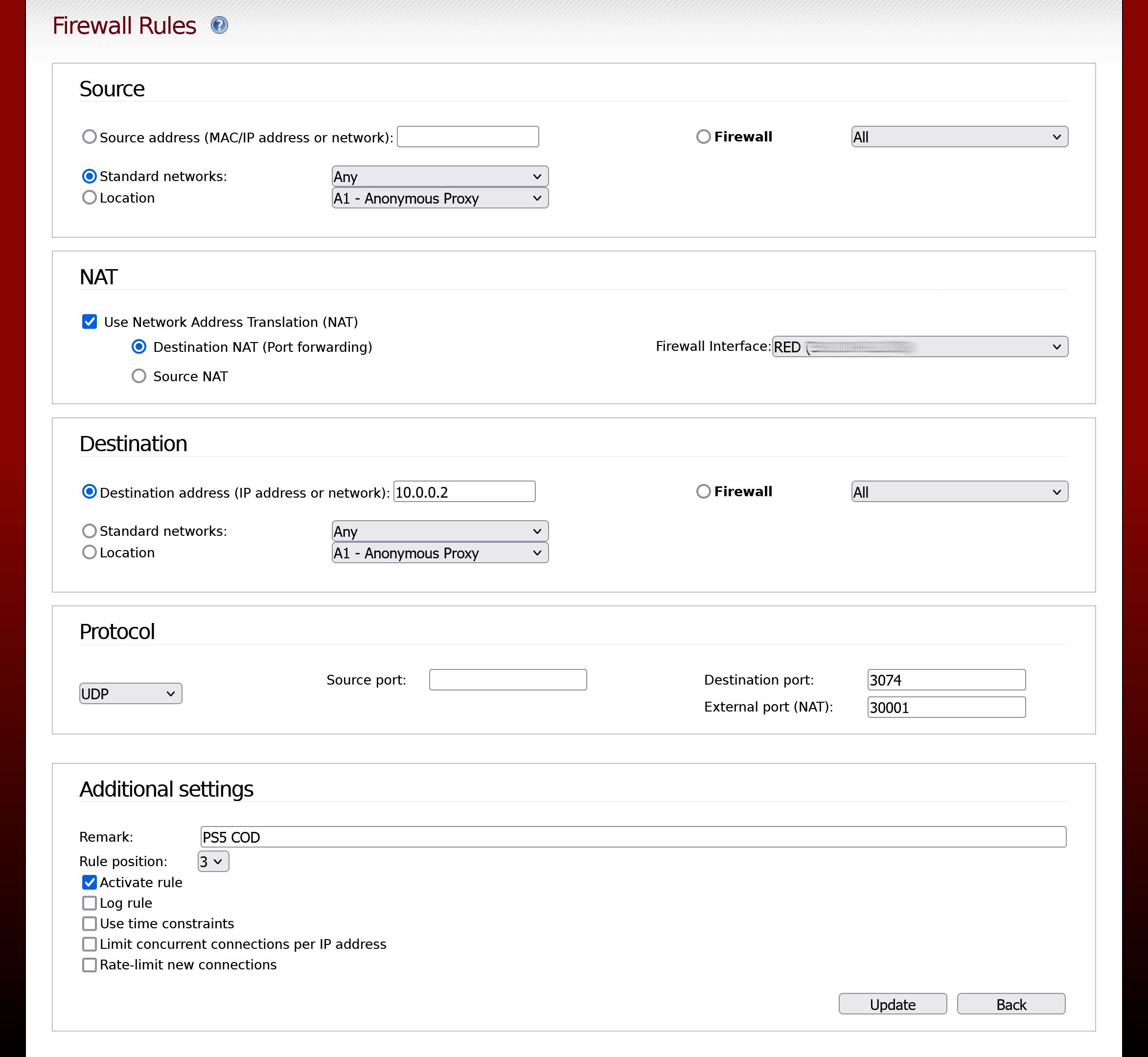
IPFire - Open NAT Call of Duty Modern Warfare multiple PlayStation 5

Image
This is a quick guide on how to setup IPFire so that multiple PlayStation 5 consoles can play Call of Duty at the same time with an open NAT connection. Call of Duty on the PlayStation 5 uses UDP port 3074. To get an open NAT connection all you have to do is port forward UDP port 3074 to your PlayStation 5's local IP. However, when you have two (or more) PlayStation 5's and you and someone else wish to play COD together at the same time, you cannot port forward UDP port 3074 to both consoles ( You can create the rule but it wont work ) and play simultaneously with an open NAT. One will work and one won't, or there will be connectivity issues resulting in both unable to play. This is normal port forwarding behavior. If you think about what port forwarding does you will understand why. It is a rule that tells your router to send all incoming external traffic inbound for UDP port 3074 to a single local IP. Incoming external traffic: UDP 3074---> send to ---> 10.0.0.2 Now...

Online gaming IPFire is better than pfsense

I've been using pfsense for a few years and it has been a good replacement over a traditional router but I've been dissatisfied with its online gaming performance. If I plug my modem directly to my PlayStation 5 and play COD MW2, things are good. If I then use pfsense, even if it is configured to allow an open NAT the gaming experience is like there is some form of delay despite having the same ping. I would describe this as other players seem to be reacting well in advanced and I appear to be out of sync. This is more evident when I watch myself dying in the kill cam and see what the other play saw me do. Either pfsense is bad, I've configured it poorly, it's a hardware issue or a combination of these things.  In any event I decided to give IPFire a go and my COD MW2 experience is like I have my modem plugged directly into my PlayStation 5. Even my PC online browsing is more responsive and things are loading quicker! I therefore recommend using IPFire over pfsense -  h...

Ubuntu 23.10 - How to build a kernel package from kernel.org

Image
First step is to install needed packages, open a terminal and type the following, sudo apt install build-essential libncurses-dev flex bison debhelper libssl-dev libelf-dev Now download your kernel source from kernel.org, you can do this using the terminal if you wish, for example; wget https://git.kernel.org/torvalds/t/linux-6.6-rc5.tar.gz This command will download the kernel to your current directory Extract the kernel archive. tar -xf linux-6.6-rc5.tar.gz Go into the directory  cd linux-6.6-rc5 Customise your kernel make menuconfig Once you have finished save and exit.        Now it is time to build the kernel package. time make -j $(($(nproc)+1)) bindeb-pkg Depending on your processor this may take some time. When it has finished your kernel *.deb package will be in your home directory. To install it, sudo dpkg -i linux-image-6.6.0-rc5_6.6.0-rc5-4_amd64.deb sudo dpkg -i linux-headers-6.6.0-rc5_6.6.0-rc5-4_amd64.deb Then reboot and enjoy your newer...

Updated my PC with Bykski water cooling products

Image
My Intel Arc A770 LE 16 GB was running a bit hot so I decided to fix it with a water block but I could not avoid upgrading everything else.  2x Bykski 360mm x40mm RC Series Radiators (CR-RD360RC-TK-V2)  1x Bykski D5 / 100mm PMMA Reservoir Pump (CP-NWD5-X-CT60-V3-100) 1x Bykski CPU Block (CPU-XPR-C-M)  1x Bykski GPU Block (I-GNA770-X) And a total of 6x Akasa SOHO AR 120mm Fans (AK-FN108) in a shiny new Antec Performance 1 FT case. Loop setup / Preparation Pump flows to [1] GPU block, to [2] Front Radiator, to [3] CPU block, to [4] Top Radiator, to [5] Pump Return. 3x front radiator (GPU) fans blow into the case, 3x top radiator (CPU ) fans extract from the case. Filled with distilled water, used to test for leaks for 24 hours, then drained. EK-CryoFuel Loop cleaner was used for 8 hours, then drained. EK-CryoFuel Superflush used for 15 mins, then drained. EK-CryoFuel Superflush used for 24 hours, then drained. EK-CryoFuel Mystic Fog Premix used as coolant - 22/09/2023 FurMa...

Windows 11 Professional - Tweaks to help gaming performance

Image
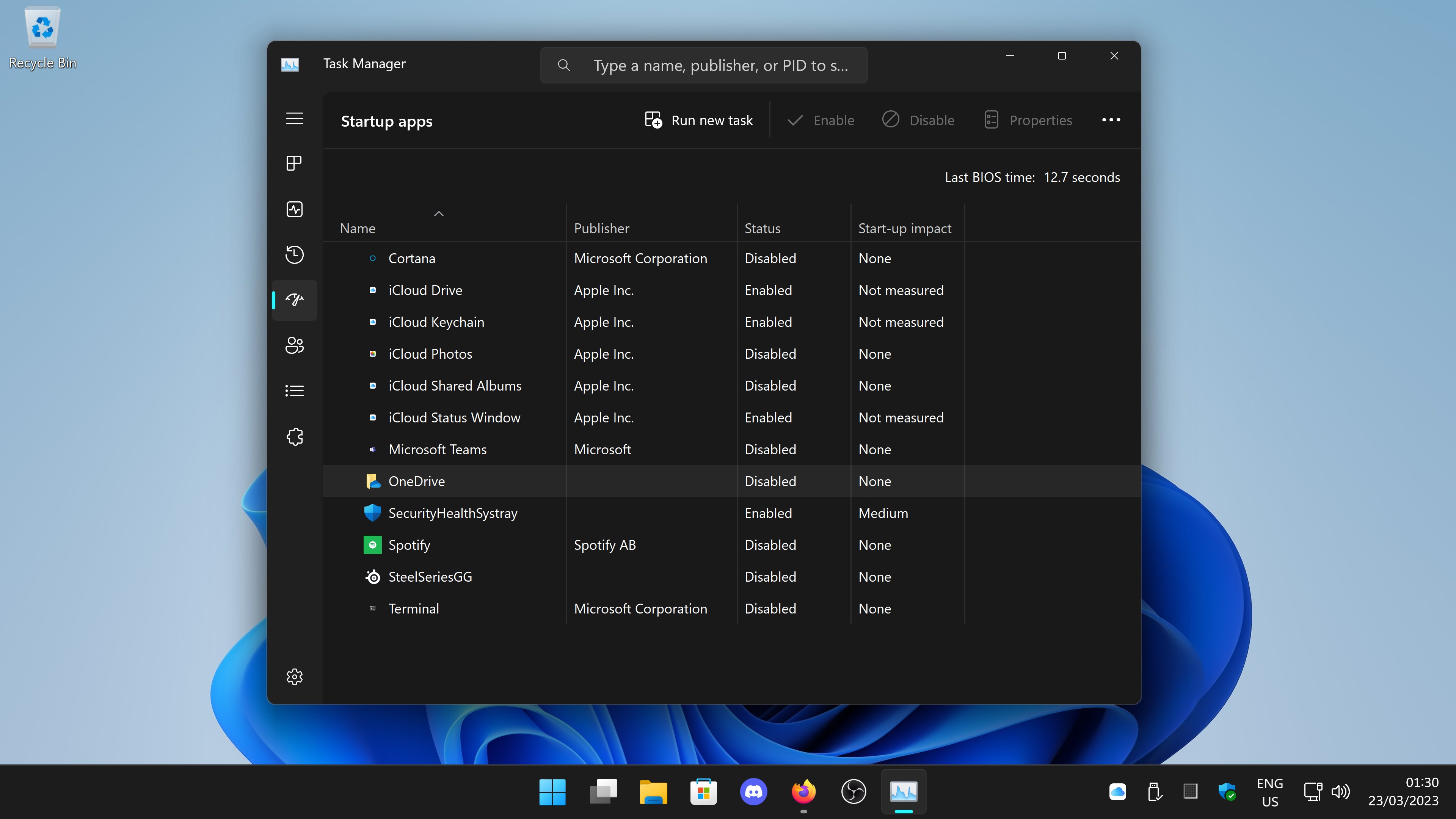
If you want that extra edge when playing games these settings and tweaks may help. Any changes that involve using the Group Policy Editor and Registry Editor will require a reboot for that change to take effect. I may update this page as time goes by, comments are open so feel free to add your comments or thoughts. Disable any unnecessary apps running at startup Use Task Manager or (Settings > Apps > Startup) to disable any unnecessary apps from running at start up Task Manager Settings > Apps > Startup Go through your start up apps and disable anything you do not need to run. In my case I have disabled OneDrive, Microsoft Teams, SteelSeriesGG and iCloud.   Disable Xbox Gamebar Go to Settings > Gaming > Xbox Game Bar and toggle the slider to off. Should you wish to capture your gameplay I would highly recommend OBS . Enabled further graphic optimisation settings Go to System > Display > Graphics > Change Default Graphics Settings and turn on any additi...

How to build a vanilla kernel RPM package Fedora 37

Image
I currently have an Intel Arc A770 LE 16GB and out of the box Fedora 37 does not support it. There are some workarounds but the best option (at the time of writing) is to use kernel 6.2.7 as that has native Intel Arc support. This is a quick guide I made for myself, it will build a linux-6.2.7 *.rpm package in Fedora 37. As with anything in Linux, there is usually more than one way to do things or a better way to do something. If you have a suggestion leave a comment below. Open a terminal  sudo dnf install ncurses-devel flex bison rpm-build elfutils-libelf-devel rpmdevtools openssl-devel dwarves perl This should install required packages to build and compile the kernel. rpmdev-setuptree This will setup your home directory for building the *.rpm package. cd ~/rpmbuild/SOURCES/ We are going to go into the SOURCES directory in our rpmbuild tree. wget https://cdn.kernel.org/pub/linux/kernel/v6.x/linux-6.2.7.tar.xz This will download linux-6.2.7.tar.xz into the SOURCES directory. tar...

Does the Intel Arc A770 LE have wide spread audio issues?

I currently have an Intel Arc A770 LE 16GB in my PC, its connected to a Sony XH90 TV with a HDMI 2.1 cable. From day one I have had issues with my audio cutting out, as in I could launch a game or decide to play a video on youtube or amazon prime and discover I have no sound. It seems completely random and happens in Windows 11 and Ubuntu 22.04 LTS.  Interestingly it seems I am not alone with the audio issues. https://community.intel.com/t5/Graphics/ARC-A770-is-killing-my-audio/td-p/1443864  https://community.intel.com/t5/Graphics/ARC-A770-Audio-Glitches-popping-stuttering/td-p/1448540 Over on the intel community forums a number of users are reporting audio issues and it could be something driver related or worse, the hardware itself.  I have found a fix that sometimes works when I lose sound from my Arc A770 which works in Windows and Ubuntu. I have found sometimes changing the screen refresh rate will make the audio function again. For example, if my refresh rate is 60H...

MPV player - My mpv.conf file for NVIDIA and AMD/Intel graphic cards in Windows

In a previous post I wrote about using MPV player on Windows with hardware decoding. This is a quick reference post for my recommended minimalist configuration settings in the mpv.conf configuration file. If you have an AMD / Intel graphics device #Default video output set to GPU. Best CPU utilisation in Windows vo=gpu    #Best for AMD GPUs  hwdec=d3d11va    #Prevent MPV closing after playback  keep-open   #Quality Upscale / Downscale filter (will increase GPU load when enabled)  scale=ewa_lanczossharp   If you have an NVIDIA graphics device  MPV for Windows and NVIDIA NVENC decoding #Default video output set to GPU. Best CPU utilisation in Windows vo=gpu #To enable NVDEC use opengl api gpu-api=opengl #Hardware decoder set to NVDEC wont work if above not set to opengl hwdec=nvdec #Prevent MPV closing after playback keep-open #Quality upscale / downscale filter (uncomment below to enable) scale=ewa_lanczossharp

ASUS CU4K30 and OBS audio drift / sync FIX

Image
To help explain how this may help you, this is my setup. PlayStation 5 Sony XH90 TV ASUS CU4K30 PC Steelseries Arctis 7P+ Wireless USB headset The PlayStation 5 is connected to the ASUS CU4K30 capture device which is connected to my PC via a USB cable, and TV via a HDMI cable (PS5 passthrough etc). I then use OBS to record my game play to my PC. I do not stream my gameplay to a service such as twitch. My USB headset is connected to my PC. The problem with OBS With OBS typically after 1 hour of recording the audio in the recording will be out of sync with the video. It also seems the severity of the audio desync progressively gets worse over time. For example, in a 3 hour recording the audio is way more out of sync with the video towards the end of the recording. The only time I become aware of the audio sync issue is when playing back the video file. I have seen various ways of attempting to fix this on the internet and they all fail to work ranging from disabling buffering on the capt...